A customer pulls in first thing Monday morning. New face, car you have not seen before. They hand you the keys and a phone number, tell you it is making a noise and they need it looked at. You reach for the job card.
Now you need the make, model, year, engine size, fuel type, and VIN. You can see a Ford badge on the front, but is it a 1.0 EcoBoost or the 1.5? 2021 or 2022?
You could ask. You could read the chassis plate. You could check the logbook if they have it. Or you could type the registration into MotorWorks and have every detail filled in automatically in under five seconds.
That is what VRM lookup does. This post explains how it works, what it actually pulls, and the difference it makes across the course of a normal working day.
What VRM lookup is
VRM stands for Vehicle Registration Mark — the plate on the car. A VRM lookup is a query that takes that plate number and returns vehicle data from a national or commercial database.
In Ireland and the UK, the relevant databases are maintained and accessed commercially through providers like Motorcheck.ie and 4tonic — both of which MotorWorks integrates with. When you type a registration into MotorWorks and hit lookup, your configured provider receives that query, matches it to the national vehicle register, and returns the relevant data — in seconds.
This is the same infrastructure used by Irish dealerships, finance companies, and insurance providers when they need to verify vehicle details. The data is accurate, current, and built specifically for Irish registrations.
What you actually get back
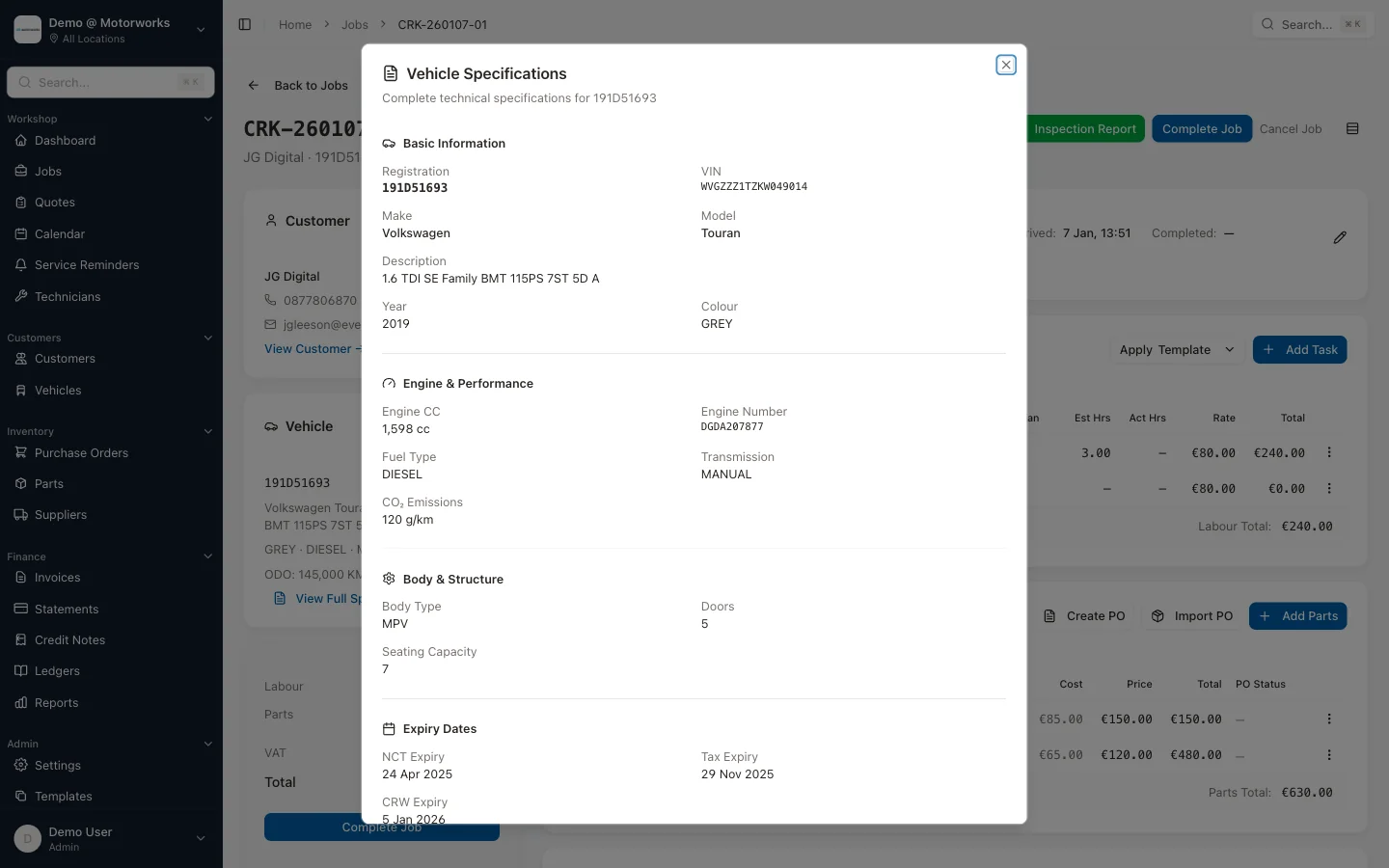
Type a reg and the lookup returns:
- Make and model — Ford Focus, Volkswagen Golf, Toyota Corolla
- Variant — the specific trim level or spec designation
- Year — exact year of first registration in Ireland
- Engine — CC, fuel type (petrol, diesel, hybrid, electric), and transmission
- Colour — as registered
- VIN — the full vehicle identification number
- NCT due date — when the next test is required (where available)
All of that comes back automatically. You confirm the details match the car in front of you, and you have a complete vehicle record ready to attach to the job card.
No asking the customer. No squinting at the chassis plate. No guessing whether it is the 1.6 or the 2.0. The engine spec is confirmed from the outset, which means parts queries go out with the right details first time — no callbacks, no wrong orders.
How the spec data feeds into daily work
The real value of VRM lookup is not just saving time at check-in. It is that the data populates the vehicle record permanently, and that record drives everything else.
Accurate parts ordering. When you know the exact engine spec from the start, parts queries go out correctly first time. No calling the customer back to check whether it is the 1.6 or the 2.0. No wrong parts arriving. For garages that raise purchase orders linked to jobs, the vehicle spec is already there when the order is created.
Job templates that match the vehicle. If you use job templates for common work — full service, timing belt, brake overhaul — the vehicle spec from the lookup helps ensure the right template is applied. A service template for a 1.0 EcoBoost is different from one for a 2.0 TDCi.
NCT date as a by-product. The lookup also returns the NCT due date where available. It is stored against the vehicle record automatically — useful context if you notice a customer’s test is coming up while they are in for other work, but it is one data point among the full spec, not a standalone feature.
The difference between a new and returning vehicle
New vehicle
A car you have not seen before gets a VRM lookup at the point of first check-in. You type the reg, the system returns the specs, you confirm them, and a new vehicle record is created with all of that information already populated. The job is attached to that record and the vehicle’s history in your system begins.
Next time they come in, the record is already there.
Returning vehicle
For a vehicle that is already in your system, selecting it by registration does not just give you the specs. It gives you the full vehicle service history — every job you have done on that car, what parts were fitted, what work was carried out, when it was last in. If you have raised purchase orders against previous jobs, you can see exactly what was ordered and what it cost.
You are not starting from scratch each time. You are continuing a record that already tells you what matters.
Where time is actually lost without it
The time saving from VRM lookup is not dramatic in any single instance. It is minutes, not hours. But those minutes add up across a working day in ways that are easy to underestimate.
Consider the typical process without lookup.
A new vehicle comes in. You write the reg on the job card, then ask the customer for the make and model. They tell you it is a Golf — you ask which year. They think for a moment. You ask petrol or diesel. They are fairly sure it is diesel. You write down 1.5 diesel, 2020 or 2021, and move on. Later, when the parts query comes through, someone has to verify the engine spec before the right part can be ordered. The customer gets a call. You wait for them to check the logbook and ring back.
That is not a disaster. It is just friction. A small interruption that ripples through the job.
With VRM lookup, that sequence does not happen. The spec is accurate from the start. The parts query goes out with the correct engine details attached. The job moves faster because the information was right the first time.
Multiply that by fifteen or twenty jobs in a week and the time recovered becomes significant — not to mention the parts errors avoided and the customer calls that did not need to happen.
Manual entry is still an option
VRM lookup works for Irish registered vehicles. Northern Ireland plates, UK imports, and older vehicles occasionally fall outside what the database can return cleanly.
For those, MotorWorks lets you enter vehicle details manually. You are not locked out if the lookup does not recognise a plate. It is just the fallback for the minority of vehicles that need it.
How it connects to the wider workflow
VRM lookup is the entry point for everything else vehicle-related in MotorWorks. The spec it returns populates the job card. The vehicle record it creates or updates becomes the foundation for service history, service reminders, and any future work on that vehicle.
None of that requires extra steps. You looked up the reg to create the job. Everything else is a by-product of that one action.
This is what the vehicle history feature in MotorWorks is built on — records that populate naturally through normal workflow rather than through additional data entry. The same vehicle record connects to invoicing, reports, and the customer portal where your customers can see their own vehicle history. It is why the VRM lookup feature sits at the centre of how a job gets started.
What this means for everyday garage tasks
Here is what VRM lookup changes in practical terms across a few common scenarios.
At check-in: New customer, unfamiliar car. Type the reg instead of asking for specs. Confirm details, start the job. Two minutes of questions replaced by ten seconds of typing.
When quoting: A customer rings for a price on brake pads. You ask for the reg, look it up, get the exact spec. The quote is accurate from the start. No callbacks for clarification, no wrong part ordered.
When a car comes back: Customer has returned with the same noise. Pull up the vehicle by reg, see the full job history, know immediately what was done last time. No searching through paper records or asking colleagues.
When planning outreach: Service intervals and vehicle data from previous lookups sit in your vehicle records. Use service reminders to contact customers when their next service is due — the vehicle data was already there because you ran a lookup when they first came in.
If you are managing a garage that runs primarily on paper job cards, it is worth reading our comparison of digital job cards versus paper — the VRM lookup is one of the reasons the gap between the two approaches is wider than it first appears.
The data accuracy question
The most common concern about relying on a lookup rather than asking the customer is accuracy. What if the database is wrong?
In practice, the data returned through Motorcheck.ie or 4tonic reflects the vehicle’s registered specification — which is the authoritative record. There can be edge cases: a vehicle that has had an engine swap, a mis-registration, an import that was not correctly registered on transfer. These are genuinely uncommon.
For the vast majority of vehicles, the lookup is more reliable than asking the customer. Customers guess at engine sizes. They confuse model years. They do not always know the variant. The registered spec is a verifiable fact.
You still confirm the details when the car is in front of you. That takes fifteen seconds. But you are confirming accuracy rather than creating a record from scratch based on what the customer thinks they remember.
Where to go from here
If you are looking at this as a standalone feature, it is useful. But VRM lookup is most valuable when it feeds into the broader system — accurate vehicle records that power job management, service history that builds automatically, and vehicle data that enables service reminders and proactive customer outreach.
Those are all things MotorWorks is built around. The VRM lookup feature is the starting point — but it connects to everything else: purchase orders, invoicing, reports, and the customer portal.
If you want to see how it works in a live system — how a lookup flows into a job card, how the vehicle history builds over time, and how it all connects to parts ordering and invoicing — a demo takes about half an hour and covers the whole workflow end to end.
Type a reg. Get everything. That is the short version. The longer version is a workflow that removes a surprising amount of friction from tasks that happen dozens of times every week.