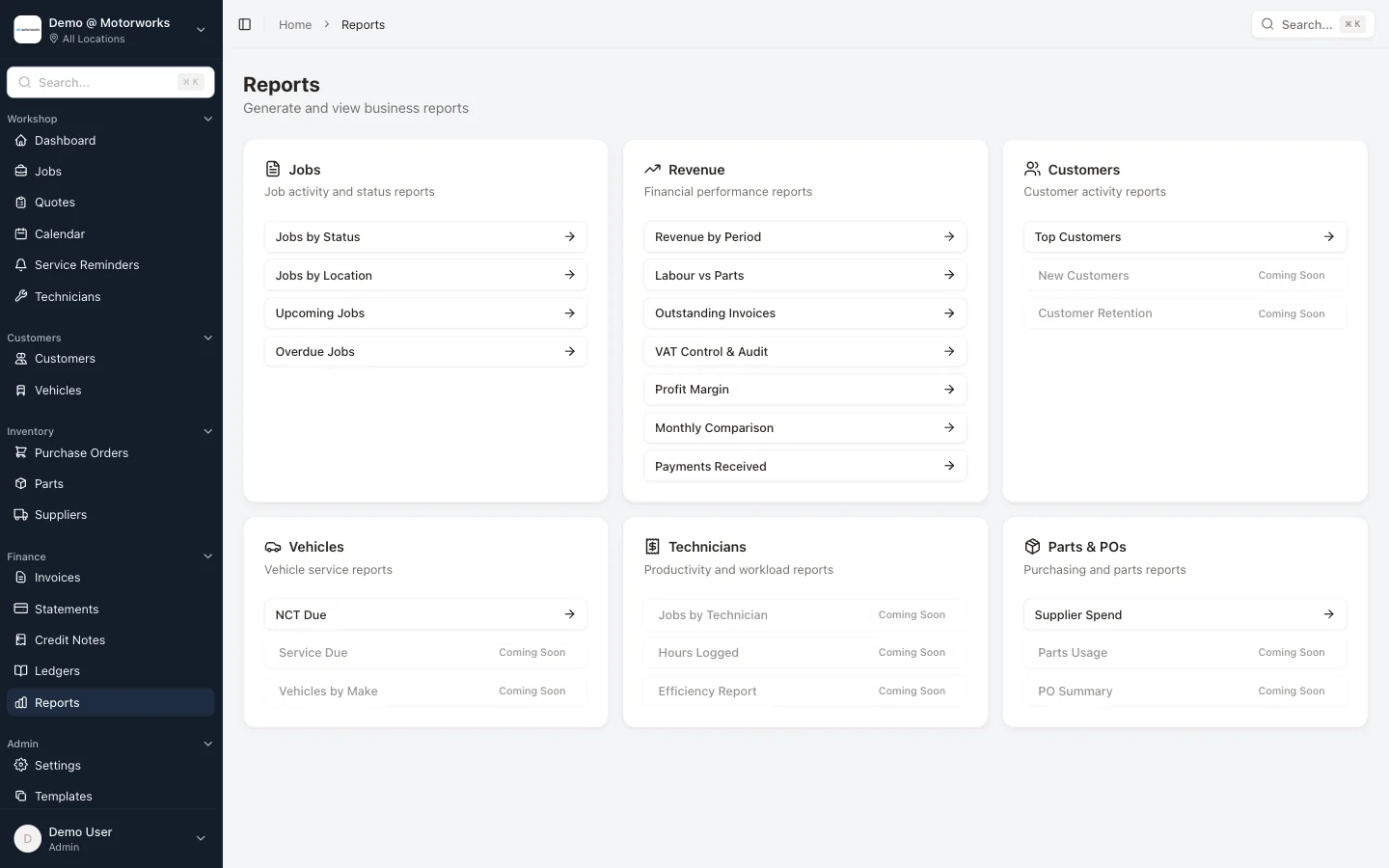
A report is useful when the manager can trace a surprising total back to the jobs, invoices or purchases behind it. A dashboard number with no route to the source record is difficult to act on and even harder to correct.
These five reviews cover the workshop, customer and supplier sides without prescribing generic industry benchmarks. Compare the garage with its own prior periods and operating plan.
1. Open jobs and time in status
Review every open job by current status, location, assigned technician and last meaningful activity.
Look for:
- booked jobs with no confirmed date or owner
- vehicles in the workshop with no active task
- jobs waiting for customer approval
- jobs waiting for parts with no open purchase record
- ready vehicles not yet invoiced or collected
- invoiced work not moved to the final state
The purpose is flow, not blame. A job may be waiting for a legitimate reason, but that reason should be visible and have a next action.
Motorworks job management and scheduling keep status, assignment and calendar context connected.
2. Quoted labour, recorded time and billed labour
Compare three distinct values:
- labour expected or quoted
- technician time recorded
- labour billed on the invoice
Differences can reveal diagnostic time that was not priced, approved additional work that was not invoiced, or a job that needed far more time than expected.
Do not treat clocked time as perfect. Review missing starts, overlaps, corrections and non-billable tasks. Motorworks technician time controls retain clock events and audited corrections so anomalies can be investigated.
The report should state how it values labour cost. A charge-out rate, wage rate and fully loaded productive-hour cost are not interchangeable.
3. Parts sold, recorded cost and stock exceptions
For completed jobs, compare parts sold with the cost recorded from catalogue, purchase or receipt information.
Investigate:
- invoice parts with no cost
- received parts never issued to a job or stock
- job parts with no customer invoice line
- supplier returns awaiting a credit
- negative stock
- repeated stocktake adjustments
The parts and purchase-order guide explains why ordered, received, fitted, returned and invoiced quantities should remain separate records.
4. Customer invoices and payments
Review:
- invoices issued in the period
- linked credit notes
- payments and part payments
- unallocated payments
- current and overdue customer balances
- document delivery failures or bounces
Use agreed credit terms for account customers rather than applying one arbitrary overdue threshold to every account. A retail invoice expected at collection and a fleet account with documented terms need different follow-up.
Motorworks supports statements and credit notes, payment allocation and document history. The garage invoicing requirements guide covers the underlying document trail.
5. Supplier commitments and due balances
Customer receivables show only one side of cash timing. Review:
- open purchase orders
- ordered value not yet received
- received purchases awaiting supplier invoice detail
- current and overdue supplier balances
- unapplied supplier payments
- expected credits from returns
A purchase order is not an invoice and a return shipment is not yet a supplier credit. Keeping those distinctions visible gives management a more reliable view of committed cash.
Motorworks supplier accounts include invoice references, due dates, payments, allocations, aged-creditor and purchase-daybook views.
Add context before comparing periods
When a total changes, check:
- selected date basis, such as invoice date or payment date
- selected location
- credits or reversals
- changes in VAT-inclusive versus VAT-exclusive display
- unclosed jobs crossing periods
- missing cost or time records
- one-off vehicle-sale or fleet work
Write the filter assumptions into exported reports. “August revenue” is ambiguous if one person used invoice date and another used job completion date.
Turn exceptions into assigned work
Each weekly review should finish with a short action list. For example:
- reception follows up three approval-waiting jobs
- parts staff investigate two receipts without stock movement
- finance allocates a payment and requests one missing supplier credit
- manager reviews repeated time corrections for one kiosk
Record ownership and due date. Reopening the same report next week should show whether the exception was resolved.
Use your own baseline
Generic profit and productivity benchmarks often hide differences in labour mix, rent, fleet work, vehicle age, staffing and accounting treatment. Build a baseline from complete records, agree the cost assumptions with the accountant and compare like with like over time.
Motorworks workshop, finance and stock reports expose the jobs, invoices, payments, time, parts and supplier records behind the period. Book a demo to run the five reviews against a representative workflow.
Product reporting scope reviewed on 2 September 2026. Management reports depend on complete source records and do not replace statutory accounts or professional advice.