Garage accounting problems usually begin before anything reaches the accounting package. A part was ordered but not added to the job. A technician spent longer than expected but the labour record was never updated. A payment arrived without being allocated to the invoice. The ledger can only report what it receives.
Workshop software should make the operational record complete and give the accountant structured, traceable information. It should not pretend that producing an invoice is the same as maintaining statutory accounts.
Workshop system and accounting ledger are different jobs
A workshop system manages the flow of work:
- bookings, estimates and customer approval
- job cards, tasks and technician time
- inspections and additional work
- parts purchasing, receiving and stock movement
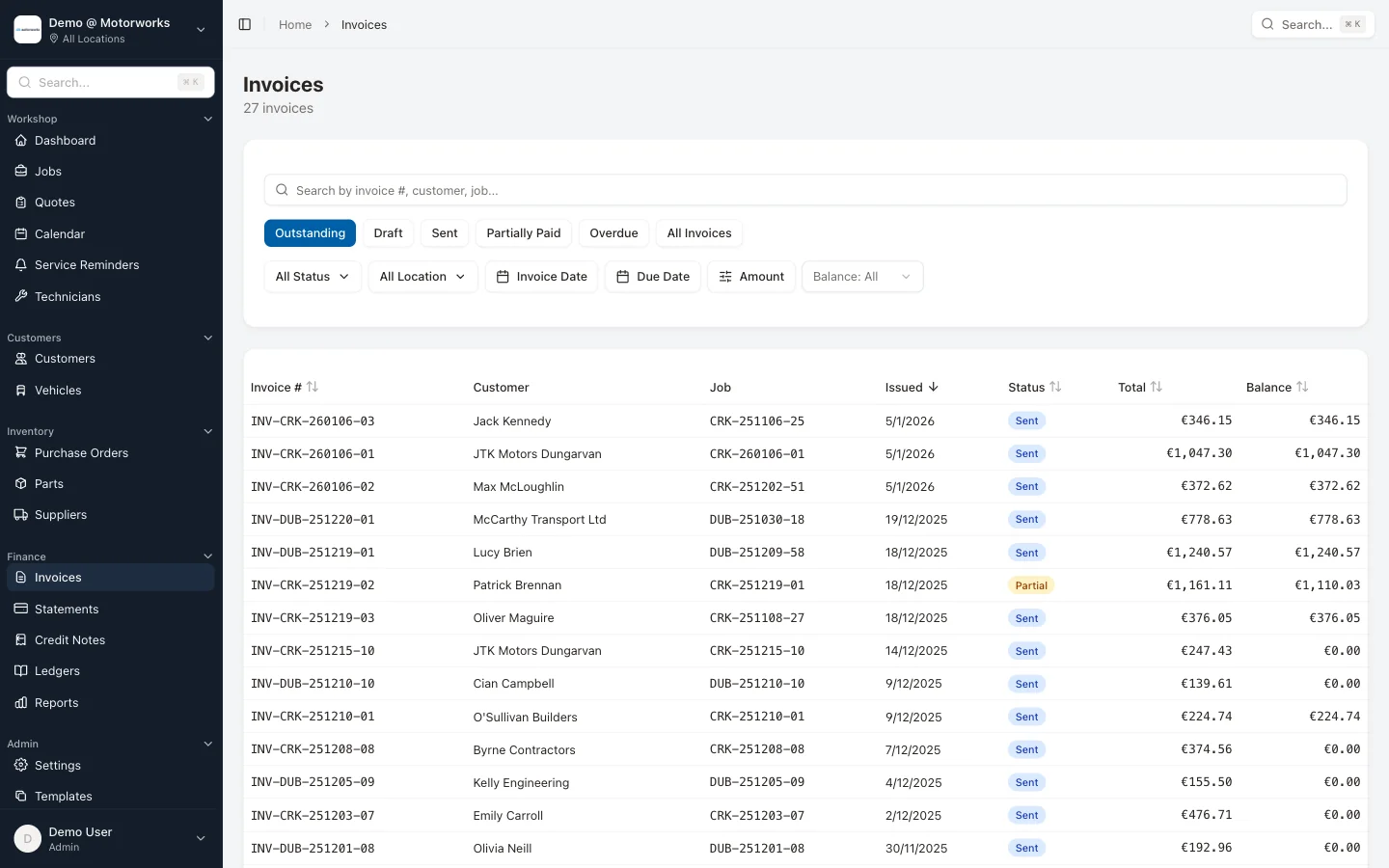
- customer invoices, payments and statements
- operational and job-profit reporting
An accounting system maintains the formal books used for financial statements, tax returns and wider business accounting. It may also handle bank feeds, payroll, fixed assets and journal entries that do not belong on a job card.
The two systems should exchange clean records, but combining their names does not remove the distinction. Ask what the product actually records, exports or synchronises before assuming it replaces the accountant’s ledger.
Follow money from the job, not from month end
The most useful financial trail begins when the work is created.
- A quote or estimate records the proposed labour and parts.
- The customer authorises the work.
- Technician time and fitted parts are recorded against the job.
- Supplier purchases and received items are linked where relevant.
- The final job becomes an invoice without retyping the detail.
- Payments are allocated to that invoice.
- Credits or corrections remain linked to the original document.
This exposes missing information before the accountant tries to reconcile it. A purchase invoice with no related stock receipt, or a completed job with unbilled parts, becomes an operational exception that can be fixed promptly.
Motorworks uses digital job cards, purchase orders, parts and stock control and invoicing to keep those stages connected.
Know the difference between revenue and collected cash
A busy invoice month is not the same as a strong cash month. Garage software should show separately:
- invoices issued
- credit notes
- payments received
- unpaid balances
- overdue customer accounts
- deposits or part payments where used
Customer statements and aged balances help reception or finance staff follow up the right account. They also give the accountant a clearer sales and receivables record.
Motorworks supports customer statements and credit notes, payment allocation and customer account history. It does not turn an overdue report into cash by itself. The garage still needs agreed credit terms and a consistent follow-up process.
Track the supplier side as its own record
A purchase order is an authorisation to buy. It is not the same document as the supplier’s invoice, and neither document proves that every item arrived.
A mature supplier workflow distinguishes:
- purchase order and ordered quantity
- goods received and receiving date
- supplier invoice number, invoice date and due date
- returns and supplier credits
- payments and allocations
- remaining supplier balance
This gives the workshop a purchasing record and gives finance an accounts-payable record. It also makes duplicate supplier references and missing credits easier to identify.
Motorworks supplier accounts include supplier invoices, due dates, aged creditors, purchase-daybook reporting, payment batches and allocations. Purchase orders and stock movements retain the operational detail around ordering, receipt and return.
Job profitability needs explicit assumptions
Revenue minus the supplier invoice total is not reliable job profit. A useful job view needs to account for:
- sold labour and the internal labour-cost basis
- parts sold and actual or recorded cost
- subcontracted work
- discounts and credit adjustments
- technician time attributed to the job
The result is still a management measure, not a replacement for statutory profit. Make the calculation method visible and keep reports scoped to the selected location and period.
Motorworks workshop and financial reports cover job progress, revenue, payments, VAT, recorded profit, technicians, stock, purchasing and supplier balances. Managers should understand the source fields before making pricing decisions from a report.
VAT belongs at line level
Irish garage VAT treatment has exceptions. Revenue lists qualifying motor repairs at the reduced rate but identifies items including batteries, mirrors, media players and tyres as standard-rated even when supplied in a repair. Tyre fitting is standard-rated, while puncture-repair services are reduced-rated.
Software should let the garage configure rates by labour code or catalogue item, show mixed rates on one invoice and report totals by rate. The configuration needs to reflect advice from the garage’s accountant.
The VAT guide for Irish garages links directly to the current Revenue entries and explains invoice correction workflows.
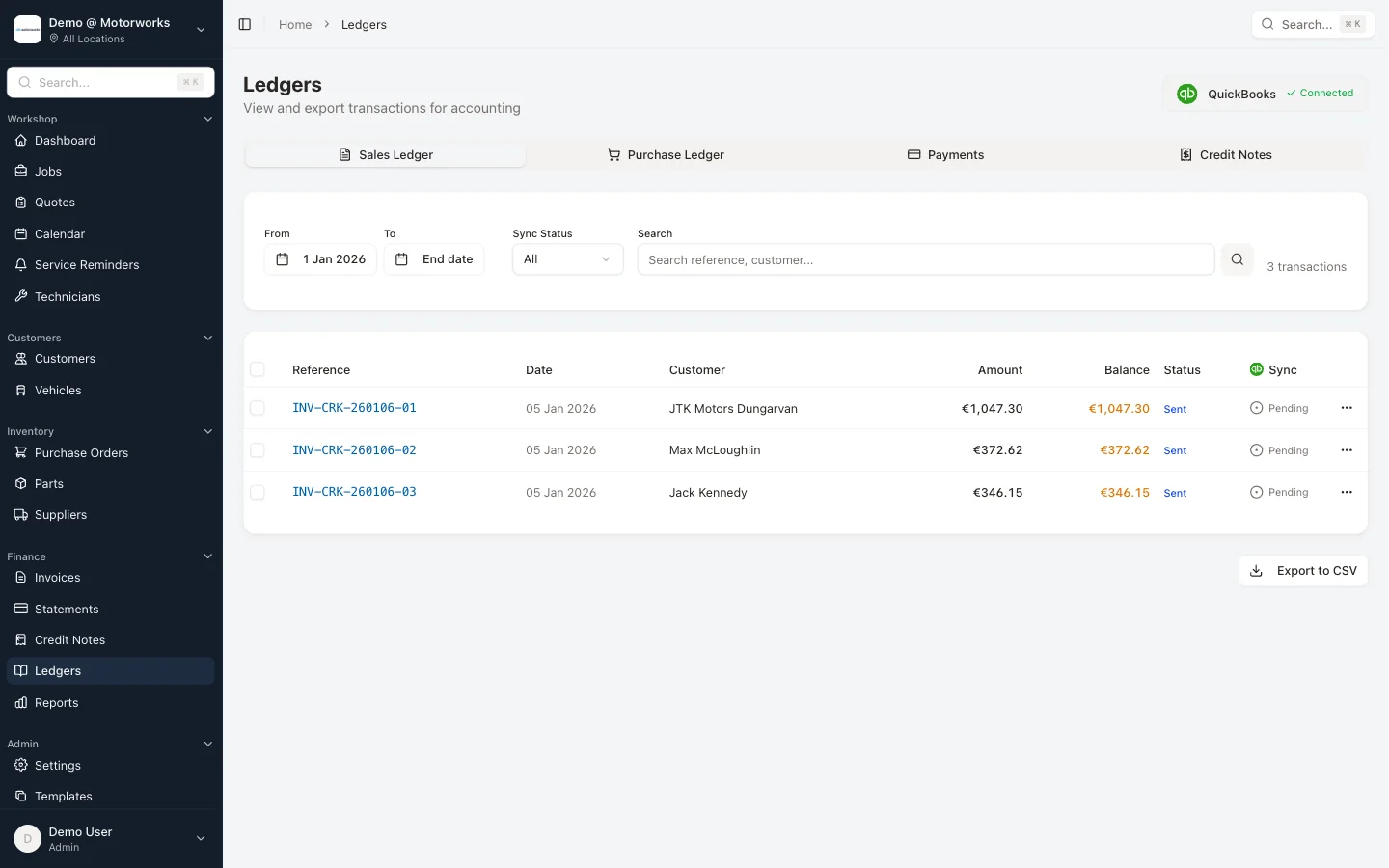
Give the accountant usable exports
An export is useful when it preserves identifiers and relationships. At minimum, agree what the accountant needs for:
- sales invoices and credit notes
- payments and outstanding customer balances
- supplier invoices, credits and payments
- VAT by rate
- nominal or category mappings where used
- period and location fields
CSV can be perfectly adequate when the columns are stable, the periods are controlled and duplicate imports are prevented. A branded integration badge does not compensate for incomplete source records.
Before changing systems, test one closed accounting period. Reconcile document counts and totals in both systems, then agree who investigates differences. Do not wait for year end to discover that credit notes were exported as positive invoices.
Document history supports the financial trail
When a customer says an invoice never arrived, finance needs more than the sent date. A central history should distinguish document creation, accepted send requests, delivery, failure, bounce and download events where the provider supplies them.
Motorworks document history records supported invoice and document events alongside the customer account. This helps staff investigate delivery without claiming a paper print event that was never captured.
What to ask when evaluating garage accounting software
Use a realistic completed job and ask the supplier to demonstrate:
- Can a quote become a job and invoice without retyping?
- Can the system show who approved additional work?
- Are parts ordered, received, fitted and returned recorded separately?
- Are supplier invoices distinct from purchase orders?
- Can payments be part-paid or allocated across documents correctly?
- Can an issued invoice be corrected with linked credit documents?
- How are mixed VAT rates configured and reviewed?
- Which job-cost assumptions drive the profit report?
- Can your accountant receive stable, structured exports?
- Can you retrieve the underlying documents and history later?
That demonstration reveals more than a dashboard full of attractive totals.
Where Motorworks fits
Motorworks is the operational and workshop-finance system. It connects customers, vehicles, jobs, inspections, time, parts, suppliers, invoices and payments, then provides reports and exports for management and accounting work.
It is not marketed as a substitute for professional tax advice or every function of a general ledger. The product is valuable because it improves the source record before figures reach the accountant.
Book a demo and bring a representative job, supplier invoice and customer payment. We can test the full path rather than discussing accounting in abstract terms.
Related guidance
- Revenue record-keeping for Irish garages
- Garage invoicing requirements in Ireland
- Parts, purchase orders and stock control
- VAT for garages in Ireland
Product capabilities reviewed on 2 September 2026. Tax treatment, filing and statutory accounts should be agreed with a qualified accountant or tax adviser.